Textmode Overlay turns web media into live terminal-style ASCII
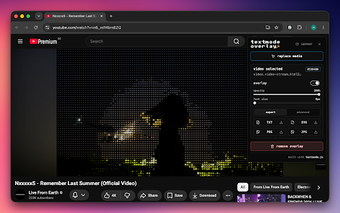
Textmode Overlay, by Christopher Dietrich (humanbydefinition), is a Chrome extension that reimagines web media as live terminal-style text for creative exploration. The extension renders video and canvas elements into an aligned character grid in real time, offering adjustable visual presets, font and glyph options, and a stack of post-processing effects. It targets creative coders, digital artists, and retro-aesthetic fans who want a distinctive, text-based way to view online videos, streams, and interactive pieces.
What the extension does and where it fits
Textmode Overlay reinterprets visible web media as live ASCII-style visuals inside the browser. After clicking the extension icon and choosing "select media," you hover to highlight compatible targets and click to start conversion. The tool operates on HTML5 video elements, WebGL canvases, and many embedded players such as YouTube and Twitch, converting motion and imagery into a grid of characters driven by brightness shading and contour passes.
How it performs during live conversion
The extension aims for real-time playback at a 60 FPS target and performs all conversion locally, so processing occurs inside the browser rather than on remote servers. That architecture supports fluid visual updates on capable hardware, while active conversion places work on local CPU and GPU resources. Expect an active runtime footprint during live sessions because the rendering pipeline runs continuously to maintain the text-based output.
What it does about privacy and restricted media
All media processing and conversion happen locally within your browser, and the developer discloses that no browsing data is collected, sold, or transferred to external servers. That local-only model keeps rendered frames and presets on the device. However, some media protected by DRM or blocked by strict cross-origin security policies cannot be accessed by browser extensions, so those sources remain unavailable to the tool.
How configurable the visuals are and how you save results
The extension exposes adjustable glyph ramps and font libraries, independent brightness and contour passes, resolution and density controls, and a post-processing FX stack with sixteen filters. Export options include TXT, SVG, PNG, and JPG outputs, and per-site memory stores page-specific presets. The project is open-source, built on the textmode.js library, and it runs on Chromium-based browsers across desktop platforms.
A purpose-built creative overlay for visual experimentation
Textmode Overlay is a focused, studio-oriented tool that complements generative and experimental workflows; its appearance on design showcase platforms underscores its appeal to creative communities. Use it as a visual instrument for demos, live performances, or generative art experiments rather than a substitute for conventional video playback. For those who enjoy text-based aesthetics, it provides a dependable, locally processed way to reinterpret web media.